What is a PIM system? Features, benefits and selection
A table receives a new description. The online shop already shows it, but a retail partner’s file still contains the old copy and the 160 cm configuration uses the smaller variant’s image. The individual pieces of information exist. What is missing is a reliable connection between product, configuration, media and output.
A PIM system helps you maintain these connections centrally and prepare product information for different uses. Whether you need one depends on your data workflow: how many different attributes, variants, languages and partner requirements must your team keep consistent?
What is a PIM system?
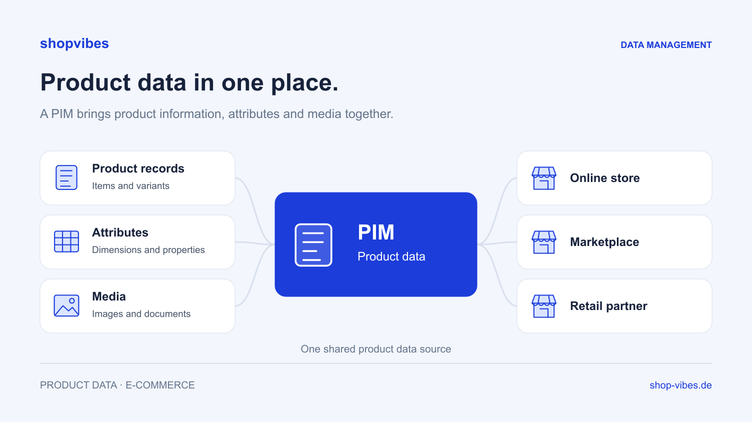
PIM stands for Product Information Management. A PIM system is software a business uses to structure, maintain and enrich product information and prepare it for shops, catalogues and retail partners.
This includes item numbers, materials, dimensions, descriptions, variants and translations. Media such as images and assembly instructions are linked to the right products. Your range and each destination channel determine which information is required.
A central data source provides a shared working record. A change at the source can then flow into outputs configured for it. This requires clear ownership, mappings and a controlled delivery process.
Which data belongs in a PIM?
A useful model describes the configuration being sold precisely enough to produce unambiguous information. For furniture and home ranges, these areas are particularly helpful:
| Data area | Example | What your team checks |
|---|---|---|
| Identity | Item number and existing product identifiers | Clear association of items and configurations |
| Attributes | Material, colour and finish | Factually correct properties with defined values |
| Variants | A table in two widths | Clear separation of shared details and differences |
| Dimensions and packaging | Overall size, sleeping area and packages | Meaning and unit of every measurement |
| Text and languages | Description for a target market | Copy derived from product facts and reviewed for accuracy |
| Media | Variant image, care or assembly instructions | Correct file linked to the correct item |
| Channel requirements | Category, permitted values and output format | Setup and maintenance for the specific partner |
Prices, stock and delivery information may come from other authoritative systems. Agree where these values are maintained and which are sent to a partner through the configured process. Central product data management does not replace that ownership decision.
When is Excel enough, and when is a PIM useful?
A well-maintained spreadsheet can be sufficient for a manageable range, a small number of editors and one output route. Effort grows when the same details must be changed in several files and systems.
Consider these everyday situations:
- Your team corrects the same value repeatedly for different retailers.
- Nobody is sure which description or image is current.
- Variants have different dimensions, materials or contents but are maintained together.
- Each new partner needs different columns, value lists or media.
- New languages and product groups generate further copies.
- Listing errors are repaired individually and return with the next export.
If several apply, examine the process in more detail. For a new product range, count edited files, manual handovers and recurring corrections. This makes the need more concrete than a universal minimum number of items.
How do PIM, ERP, DAM and feed management differ?
These terms describe different tasks. A platform can combine several of them, but responsibility for the data should remain clear.
| Area | Typical task | Question for your project |
|---|---|---|
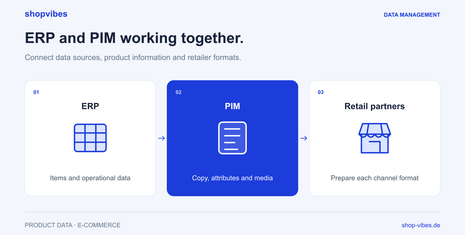
| ERP | Maintain operational master data and business processes | Which data remains authoritative here? |
| PIM | Structure and enrich product information | What additional details do sales and e-commerce need? |
| DAM | Manage media and make it findable | How do images and documents stay linked to the right configuration? |
| Feed management and distribution | Adapt data to destination structures and delivery routes | How does the product record become the right partner output? |
An existing ERP or PIM can remain the source for agreed data. Identify the gap you want to close: product maintenance, media assignment or retailer preparation. Our ERP and PIM comparison explores that decision.
How does a PIM work in practice?
1. Identify sources and owners
Record which details come from an ERP, suppliers or other files. Decide who verifies and adds missing attributes. An uncertain material value remains uncertain after an import.
2. Structure products and variants
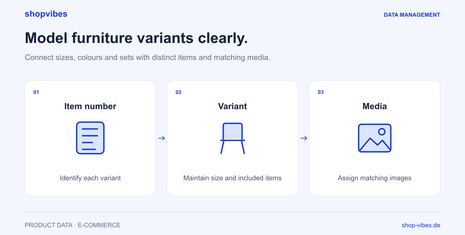
Assign shared range information and variant-specific properties. One model name may apply to several variants; the width and variant image must belong to the specific configuration.
3. Enrich and check content
Add text, media and translations using approved product information. Check completeness and inconsistencies against the rules configured for your workflow. Claims about material or contents still need a reliable source.
4. Map each partner’s requirements
Map internal attributes to destination fields. A retailer may require different colour names, a particular unit or its own category assignment. These rules belong in a reusable mapping.
5. Inspect a test output and the result
Generate a file or use a configured interface. Check the output first, then processing at the partner. Technical delivery and actual publication are separate checkpoints.
Example: A dining table in two widths
This fictional example illustrates an internal model. It is not an official retailer template or intended for a real upload.
| Property | 120 cm configuration | 160 cm configuration |
|---|---|---|
| Internal item number | DEMO-TABLE-120-OAK | DEMO-TABLE-160-OAK |
| Product family | TABLE-LINN | TABLE-LINN |
| Width | 120 cm | 160 cm |
| Depth and height | 80 cm and 75 cm | 80 cm and 75 cm |
| Material | Melamine-faced chipboard | Melamine-faced chipboard |
| Contents | One table; chairs excluded | One table; chairs excluded |
Shared copy can explain the range. The individual description and retailer output must show which width is being sold. If the mapping accidentally uses a shared range field, both items may be output as 120 cm wide.
Correct the mapping to take the width from each variant, then compare both outputs side by side. This test identifies the cause before it spreads to more products. Our guides to furniture variants and product and packaging dimensions explain the details.
Benefits of a PIM system
The practical benefits come from reliable workflows:
- Less repeated maintenance: A verified change becomes a shared source for configured outputs.
- Traceable variants: Differences are held against the item and can be checked directly.
- Clearer collaboration: Product knowledge, copy and media share a common reference instead of scattered file versions.
- Reusable partner rules: Checked mappings can be used for other suitable items.
- More targeted corrections: A gap is addressed at its source and checked again afterwards.
The reduction in effort depends on your starting point, configured processes and the tasks actually removed. Measure the work for a representative product group before and after implementation.
Which costs should you consider when choosing a PIM?
Alongside the recurring software price, consider data modelling, import, cleanup and destination-channel setup. Additional languages, complex variants or many different templates can require further coordination.
Clarify these points in a proposal:
- Which functions and user accounts are included?
- Which sources, categories and partners will be configured?
- Who handles migration, mapping and factual data corrections?
- Which tasks can your team perform afterwards?
- How are new requirements and changes to retailer templates handled?
A demo using your own test data helps answer these questions through a real workflow.
PIM selection checklist
Use a product family with several configurations and a current retailer requirement in your evaluation. Ask to see how the system handles your actual tasks.
- Can shared information, variants and sets be represented clearly?
- Are product, packaging and, where relevant, sleeping-area dimensions kept separate?
- Can media be assigned to the right configuration?
- How do value lists, units and partner-specific outputs work?
- Which errors can your team see before or after submission?
- Which data continues to come from an ERP or existing PIM?
- How are the configured content, prices and stock updated?
- Which steps remain with your team and the retail partner?
How should you introduce a PIM?
Start with a manageable product group and clear destination channels. Assign owners, clean the source data and configure the required mapping. Test a simple item and the variant cases common in your range.
Document what the partner accepted and how the product actually appears. Extend the range once this process has been checked. A sustainable model also needs someone responsible for new products and changed requirements.
Where shopvibes fits
shopvibes connects product information and media with preparation for retail partners. You can maintain product data centrally and prepare it for configured templates or interfaces. Mapping and delivery scope are agreed for each partner.
Our retailer template guide includes a practical mapping example. The furniture solution connects variants, dimensions and media with output routes. Product-data SEO for furniture manufacturers shows how specific attributes answer buying questions. The AI search and shopping checklist covers preparation for search services and internal work with AI assistants. Bring your range and a partner requirement to a demo to discuss the next steps.
Common PIM questions
Does a small team need a PIM?
Team size alone does not decide this. Data complexity and repeated maintenance matter. A small team may benefit from a shared source when it manages several partners and many configurations.
Can we keep an existing ERP?
Yes, an existing system can remain the agreed source. Setup defines data ownership, exchange and additional product information.
Are products automatically published after export?
That depends on the configured delivery route and partner process. A generated file or accepted interface request does not confirm publication. Check feedback and the actual retailer-side state.
Can we simply import every existing Excel file?
Files can be data sources. Your team should first decide which values are authoritative and how conflicts will be resolved. Importing does not replace that factual decision.
Review date and sources
Updated on 3 November 2026. Examples describe an internal model. Binding requirements come from the relevant partner process. Product workflows are explained in the shopvibes help articles on mapping and template exports (German).
About the author

Author
Tim Hoffmann
Chief Product Officer, shopvibes
Tim Hoffmann is Chief Product Officer at shopvibes. His work focuses on product data management, marketplace integrations and e-commerce workflow automation.